
You’ve probably seen the movie version of coding: someone hammering out hundreds of lines of complex code in one caffeine-fueled burst, and somehow… it just works. In reality, software development rarely looks like that. The programs that remain understandable, maintainable, and reliable are built more gradually and thoughtfully. There’s no single “right” way to code, but there are habits and techniques that make a real difference, especially for those moments when your code stubbornly refuses to do what you want. “One Step at a Time” is an iterative process of change, test, evaluate, refine, then repeat. This habit can save time, reduce frustration, and improve your debugging skills.
Understanding Errors
Not all bugs are created equal, and figuring out what kind of error you’re dealing with is half the battle.
A syntax error (like a missing parenthesis or typo) is usually the easiest to fix because your code often won’t run until you correct it. IDEs and editors with syntax highlighting make these errors easier to spot, while modern coding tools can even prevent them by automatically completing keywords, methods, and statements as you type.
If our tools can catch these mistakes so easily, how does code still make it into the wild and crash when someone uses it? Usually, the culprit is a runtime or logic error.
A runtime error occurs while the program is executing. The code may be syntactically correct, but that doesn’t guarantee it will behave properly. It’s like writing a grammatically perfect sentence that doesn’t make sense. Your program might compile successfully but then throw an exception, produce an invalid result, enter an unexpected state, or otherwise behave incorrectly.
Logic errors can be even trickier because the code runs without crashing. It just doesn’t do what you intended. For example, suppose a game should award a bonus when a player’s score reaches 100, but the condition is written incorrectly. The code can be syntactically valid and look reasonable while still producing the wrong result.
Each type of error calls for a different approach: syntax errors need a careful read-through, runtime errors often point you toward the line that broke, and logic errors require you to trace your reasoning step by step. Once you know what kind of bug you’re chasing, you’re no longer poking around blindly. You know where to look and which tool to reach for.
Common Error Types
- Syntax Errors: Code doesn’t conform to the language’s rules (similar to misspelling a word or forgetting punctuation in an essay).
- Runtime Errors: Code successfully compiles and begins running, but an error occurs during execution.
- Examples:
- Input/Data Errors: The code receives unexpected input or data. For example, it is expecting an integer, but a string is entered instead.
- Integration Errors: Code that works on its own does not when integrated with other components.
- Examples:
- Logic Errors: Code executes correctly, but the result is not what you expected.

One Step at a Time
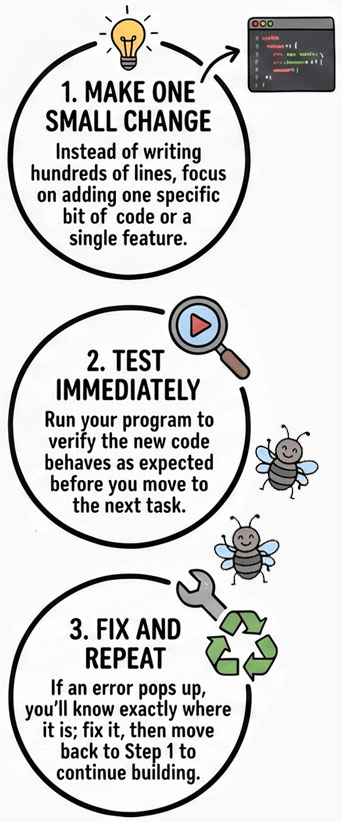
A helpful programming habit is to make one change at a time and verify that it works before moving on. It can help you better understand how code behaves, make debugging easier, and strengthen your problem-solving skills.
One step doesn’t necessarily mean one line of code. It means making a small enough change that you can understand what you changed and evaluate its effect. Software is a system of interconnected parts, and it can be fragile – every new component can introduce a new point of potential failure. When you try to add too many things at once, the parts might interact in ways you didn’t expect. Imagine adding four new components at once, and suddenly there are dozens of errors. Determining what exactly happened may take longer because there are several types of issues that can arise. It could be a simple misspelling or missing punctuation, or it could be an integration error between components.
Here’s an analogy: adding a lot of code at once before testing any of it is like cooking dinner and dumping in ten new spices all at once. If the dish ends up tasting off, good luck figuring out which spice is the culprit. But if you add them one at a time, tasting as you go, you can pinpoint exactly which one threw things off. Coding works the same way; add and test small pieces one at a time so it is easier to catch exactly where something goes wrong.
More Effective Debugging
One step at a time might sound slower, but consider how much time debugging can consume when you don’t. Testing as you go gives you immediate feedback: you make a change, see what happens, and adjust right away. That tight feedback loop helps you catch bugs and learn faster because you can connect cause and effect instead of guessing.
Research on learning suggests that unexpected outcomes can create valuable opportunities for learning. That “wait, that’s not what I thought would happen” moment is exactly what sticks with you. Errors provide that same kind of feedback – a clear signal that something in your mental model of the program needs updating. It’s like tasting your dish as you cook: you can pinpoint exactly what needs adjusting.
Once you start seeing errors this way, something shifts. Instead of a red error message feeling like a personal failure, it becomes useful data. It’s not “I did something wrong,” it’s “here’s information I didn’t have a second ago.” An error isn’t evidence that you’ve failed; it’s evidence that your mental model and the program’s behavior don’t match. Debugging becomes less about fixing your mistakes and more about figuring out why your expectations and the results differ.
Testing incrementally also dramatically reduces the search space when something goes wrong. Even experienced programmers don’t always know the cause of a bug immediately. But when they’re adding and testing code in small steps, an error points to a much smaller set of possible causes. That may feel slower at first, but it can save you from hunting through fifty lines of untested code later.
Example Scenario
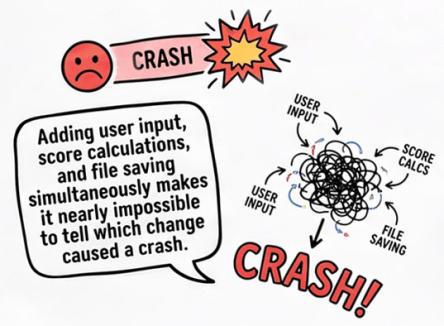
Imagine you’re building a text-based adventure game. So far, everything is working: it prints the player’s starting score and introduction to the game world correctly. Then inspiration strikes, and you add several features at once: user input, difficulty-based scoring, and file saving. But when you run the game, it crashes.
Now you’re left wondering: which change caused the problem?
It can feel productive in the moment as you add new features and bring your vision to life. But when you make too many changes at once, it becomes much harder to figure out where something went wrong or how to fix it. With so many interconnected pieces to keep track of, your brain can quickly become overloaded, making it harder to process what happened and decide what to do next.
If you add and test each feature separately, you’ll know which change introduced the problem.
Safe Working Version
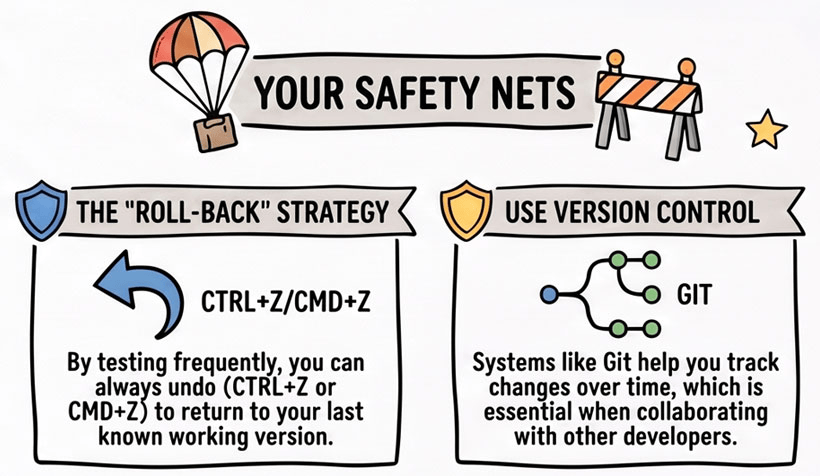
When you test and back up your work frequently, you create a safety net of working versions. If a new change introduces a problem, you can quickly remove or revise that change and revert back to a previous stable state.
There are several ways to create this kind of safety net, but one of the most reliable is using a version control system such as Git which is free and open source. It keeps a history of your code and tracks changes made by you and other developers on the project. If something goes wrong – whether you accidentally delete important code or introduce a tricky bug – you can use that history to restore an earlier version and get back on track.
- Quick fixes: You can usually revert recent changes in editors with the undo shortcut (Ctrl+Z on Windows/Linux or Command+Z on Mac).
- Long term stability: For more reliable and long term rollback to earlier versions, use a version control system to track changes to code and files. This is especially helpful if you are working with other developers.
Summary
If you are a new programmer, develop the habit of adding or changing one small thing, testing, evaluating, then fixing any bugs before continuing. Along with “save early, save often”, “one step at a time” can have a significant positive impact on your coding experience. Professional programmers rarely write hundreds of lines of code before testing. Instead, they build software incrementally. Programming can be a creative practice and, like many artists, programmers can use a cycle of “change, test, evaluate, refine”.
One Step at a Time Key Takeaway
One step at a time means making a small enough change that you can understand what you changed and evaluate its effect. This simple habit makes debugging easier, reduces frustration, and helps you learn faster.
One Step at a Time Coding Habit:
- Change: Make a small change
- Test: Test the change
- Evaluate: Evaluate the result
- Refine: Fix any issues
(repeat steps)

Expand Your Knowledge
- Build Strong Coding Habits
- Computational Thinking: A Framework for Problem Solving
- Solving Logic Errors: Debugging Buddy (Rubber Duck Programming) at Programming is Fun
- Rubber duck debugging (Wikipedia)
- The Pragmatic Programmer book (publisher’s site)
- How to Debug Small Programs
- Problem Solving in Programming
- What is Version Control? (GitHub)
- Git: a free and open source distributed version control system
- Exploring the Role of Errors in Programming Learning (2026, ACM)

