
Computational thinking can help us tackle a wide range of problems.
Think about a challenge that feels overwhelming: writing a research paper, figuring out what career you want, or even just trying to get through a really complicated project. Where do you even start?
Computational thinking gives us some practical strategies for figuring that out. It helps us break big, messy problems into smaller pieces, spot patterns, focus on what really matters, and create a step-by-step plan for moving forward. These are the same kinds of strategies software engineers use when they write code, but you don’t have to be a programmer to use them.
We’ll explore four key parts of computational thinking: decomposition, pattern recognition, abstraction, and algorithms. And we’ll also talk about evaluation – how we can look at what we’ve tried, figure out what’s working (and what isn’t), and make our approach better.
Whether you’re solving a programming problem or just trying to make sense of a complicated challenge in everyday life, computational thinking can give you a useful way to break things down and move forward.
Decomposition
Tackling a complex problem is rarely straightforward. Complex problems often involve many variables, making them difficult to understand and potentially overwhelming to solve. Solutions designed for “the entire problem at once” can become highly specialized and less reusable, extensible, or scalable.
A more effective approach is to break the problem into smaller, more manageable parts. These smaller components are easier to understand, analyze, and solve. Decomposition is a fundamental pillar of computational thinking, but its value extends far beyond programming. It is a problem-solving technique that simplifies complex tasks by breaking them into smaller, more manageable pieces.
How is decomposition different than just making a to-do list? What separates true computational decomposition from just being an organized person with a notepad? Decomposition isn’t merely listing something, like a set of chores. You’re analyzing the structure of a larger problem and breaking it into meaningful subproblems that can be understood and solved independently or systematically. Once you do that, you might also discover reusable components.

You may also encounter this concept under different names, such as modularization, factoring, partitioning, subdividing, chunking, or divide and conquer. In object-oriented programming (OOP), key principles such as abstraction, inheritance, polymorphism, and encapsulation all rely on the ability to first decompose a problem into smaller, well-defined components.
How is Decomposition Relevant?
Imagine an app on your computer that’s been given an impossible task – something it completely fails to understand. What does it do? It doesn’t get anxious, and it definitely doesn’t lie awake at three a.m. just staring at the ceiling. It will probably just throw an error code, stop, and wait for better instructions.

But think about someone just graduating from college and starting their first job search. The reaction by a person is so different – they don’t just stop and wait for a new prompt. They might stress, get anxious, or panic. The organic brain tries to process the entire massive looming problem all at once, and that can lead to cognitive overload. It’s too much data.
If you utilize mental frameworks that software engineers use to write code, you can tackle massive, ambiguous life challenges like searching for a career-defining job in a systematic and efficient manner. Instead of being reactive (and maybe stressing), you are engineering a solution.
And, if you are a developer, you can create better software by using these concepts.
Decomposition Example: Research Paper
Problem: Complete a research paper by the end of the semester.
Instead of treating it as one large task, decompose it into smaller components. For example, “complete a research paper” could have these components:
- Understand the assignment
- Choose and refine a topic
- Conduct research
- Develop a thesis and outline
- Write the first draft
- Revise and edit
- Finalize and submit
By decomposing a complex, ambiguous problem into concrete components, you create achievable, assessable units. Generalized components: Plan, Research, Organize, Produce, Improve, Refine, Complete, Submit. Thinking in this modular way, you can create a workflow process for a wide range of assignments. You don’t need to reinvent your process for a new class.
This process can also make it easier to set up a timeline. For example, if you have 8 weeks before a research paper is due, you can decompose and organize “complete a research paper” into a scheduled set of tasks like this:
- Week One (Plan):
- Understand the assignment
- Read the prompt and grading rubric.
- Identify the required format, length, and deadline.
- Choose and refine a topic
- Brainstorm possible topics.
- Narrow the topic to a manageable research question.
- Understand the assignment
- Week Two (Research):
- Conduct research
- Find credible sources.
- Read and take notes.
- Organize evidence and citations.
- Conduct research
- etc.
Decomposition Example: First Job Hunt

Problem: Start professional career by finding a job that matches education and skills.
Potential components:
- Define career goals
- Prepare application materials
- Research opportunities
- Build qualifications and network
- Apply for jobs
- Prepare for interviews
- Evaluate offers and make a decision
These can be broken down further. For example, the first two components could have these sub-components:
- Define career goals
- Identify target roles and industries.
- Determine preferred locations and work arrangements.
- Prepare application materials
- Create or update a resume.
- Write a general cover letter template.
- Build or update an online profile and portfolio.
Once you have a system set up that works for you, you don’t have to reinvent everything for your next job search. Just reuse the appropriate modules and add in the details.

Pattern Recognition
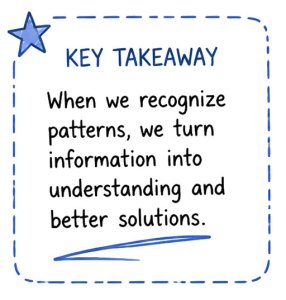
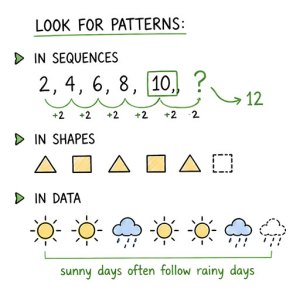
After decomposing a complex problem into smaller components, look for patterns. Patterns can be common characteristics, structures, or behaviors shared by multiple problems. This is an important step to optimize your efforts so you are working smarter, not harder.
Pattern recognition is the process of identifying similarities so that we can solve problems more efficiently and effectively. If multiple components share the same pattern, an existing solution can be reused rather than creating an entirely new one. Recognizing a pattern can help us design a generalized solution that can be applied to many similar problems in the future.
Reusable solutions are valuable because they reduce development effort and make systems easier to maintain, extend, and scale. In software development, many common challenges have been studied extensively, resulting in established design patterns that provide proven solutions to recurring problems. By recognizing patterns, developers can leverage these existing approaches instead of repeatedly solving the same problem in different ways.
Decomposition helps us break problems into manageable pieces; pattern recognition helps us identify similarities among those pieces and apply solutions more effectively.
Pattern Recognition Example: Job Interview
Before a job interview, pattern recognition can help you prepare more effectively by identifying underlying skills employers are trying to assess. For example, many interview questions are designed to evaluate the same qualities, such as resilience, teamwork, communication, or conflict resolution. Questions such as “Tell me about a challenge you overcame,” “Describe a time you received difficult feedback,” or “How do you handle setbacks?” all give you an opportunity to demonstrate resilience.
By recognizing these patterns, you can prepare a small set of meaningful examples from your experiences and adapt them to answer a variety of questions with confidence. This allows you to focus on communicating your strengths rather than memorizing answers to dozens of individual questions.
Abstraction

Abstraction is the process of focusing on the essential aspects of a problem while filtering out unnecessary details.
How is this different than just focusing on the parts we like best? Do we just make everything vague? Similar to the previous concepts, intentionality is critical. Abstraction isn’t meant to be vague. Abstraction requires immense discipline because we need to identify what is critical and strip away what is not.

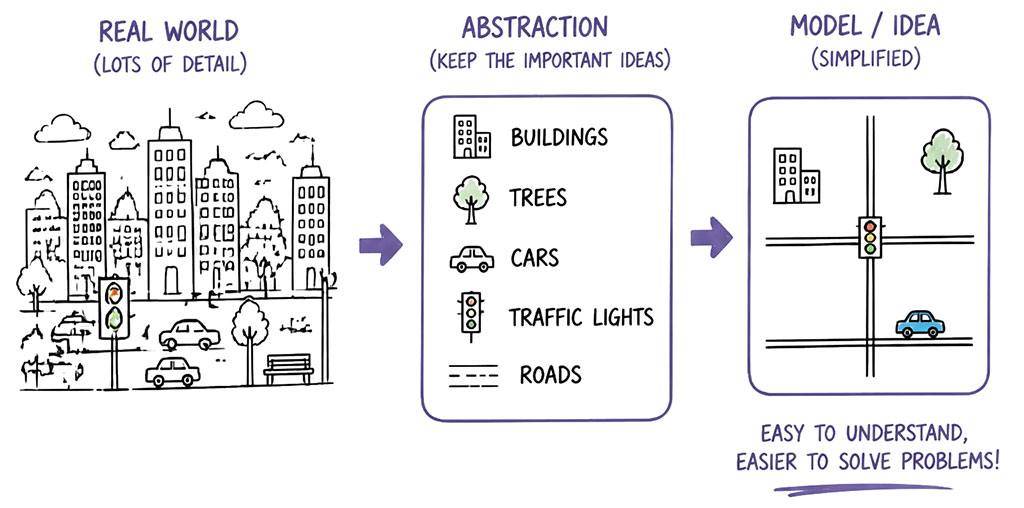
Our goal is to create a simplified representation of a complex system, called a model. Models help us understand how a system works, communicate ideas more clearly, and design solutions without becoming distracted by details that do not affect the outcome. A good model still has highly specific details, just like a map has specific, highly detailed road names.
Abstraction is a fundamental component of computational thinking because it reduces complexity and allows us to focus on the information that is most relevant to solving a problem. By working with models instead of every individual detail, we can develop solutions more efficiently and apply them to a wider range of situations.

Abstraction Example: Map
A map of a city is a highly abstracted model of reality. It includes important information such as roads, landmarks, and distances, while omitting unnecessary details like the color of buildings, the species of trees, or the number of people walking on the sidewalk. If a map included every detail it would be overwhelming. By focusing only on the information needed for navigation, a map becomes a useful model of reality.
Abstraction Example: Job Hunt
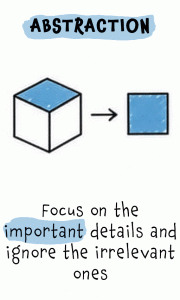
Abstraction means focusing on the important information while leaving out unnecessary details. Your elevator pitch and your resume both use abstraction: they are not complete biographies but carefully selected summaries that emphasize the qualifications, experiences, and skills most relevant to the position you want. This makes it easier for employers to quickly understand why you are a strong candidate.
How can you make sure you aren’t vague and generic in an interview? How do you balance the rule of abstraction with the demand for specific details? If you are answering an interview question about a successful marketing campaign, giving the specific percentage of revenue growth is a vital point – that proves you performed well. However, adding that you replaced toner in the printer when printing out product materials is not critical. In this scenario, it’s noise. It might have been true. Maybe you also had to restock the paper in the printer three times. But those details detract from the essential information you want to communicate about how successful you are at marketing.
Algorithms
Although algorithms can become very sophisticated, the basic idea is straightforward: an algorithm is a sequence of instructions used to solve a problem or complete a task.
A recipe is often used as an analogy for an algorithm because it provides a sequence of steps that transforms ingredients (inputs) into a finished dish (output). However, unlike computers, humans can interpret vague instructions such as “stir until smooth” or “cook until golden brown” using experience and judgment. Computers cannot make these kinds of assumptions. They require precise, unambiguous instructions. For example, if you told a computer to “cook until golden brown,” it would have no way of knowing exactly what shade of brown you meant unless that condition was explicitly defined. This is why algorithms must specify each step clearly and account for situations that could otherwise be interpreted in multiple ways.
Algorithm Definition
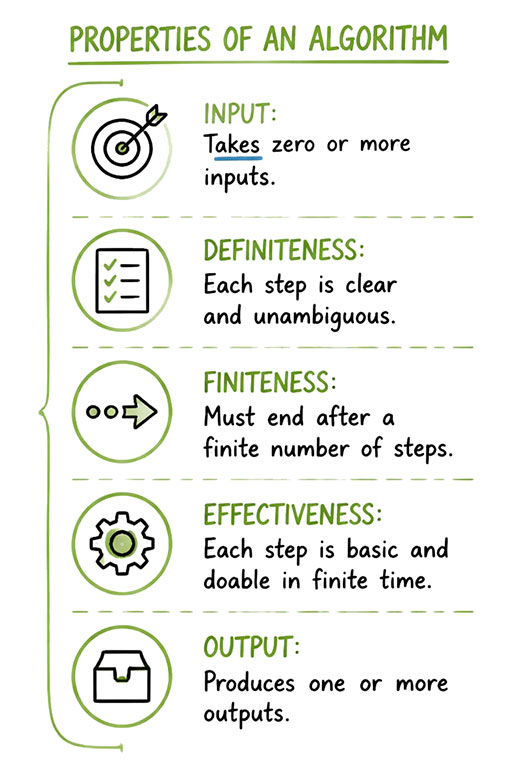
Not everyone agrees on a single definition of an algorithm, and definitions often vary by discipline. In computer science, the criteria proposed by Donald Knuth are commonly used to describe the characteristics of an algorithm:
- Finiteness: An algorithm must eventually terminate after a finite number of steps.
- Definiteness: Each step must be clearly and unambiguously defined.
- Input: An algorithm accepts zero or more inputs.
- Output: An algorithm produces one or more outputs.
- Effectiveness: Each step must be simple enough to be performed accurately in a finite amount of time.
Together, these characteristics help distinguish an algorithm from a general set of instructions or a loosely defined process.
Algorithm Example: Job Hunt

You might have heard someone say “I’m gonna wake up and apply to jobs all day”. If we evaluate that statement against Knuth’s criteria, it fails on every aspect. It’s an ambiguous statement that is hard to assess for success.
For example, consider the first two characteristics finiteness and definiteness:
- Finiteness: “all day” is not a finite defined boundary. How do you know when you are done? Does it mean from the time you wake up until the time you go to sleep? Or is it from 9:00 am to 5:00 pm? There are many ways to interpret the phrase “all day”.
- Definiteness: What does “wake up and apply to jobs” actually mean? It’s ambiguous.
- “wake up” at what time?
- “apply” – does that include searching for open positions, reading job descriptions, tailoring resumes, writing cover letters, submitting applications, following up? Are you sending cold emails? Are you filling out random web forms?
- “jobs” – which industry? Which job positions?
Identifying inputs, processes, and outputs improves our “apply to jobs” objective. Examples:
- Inputs: Degree, skills, experience, resume, professional network.
- Processes: Research, networking, applying, interviewing.
- Outputs: Job interviews, job offers, accepted position.
How can the statement “I’m gonna wake up and apply to jobs all day” be transformed into steps that can be performed accurately in a finite amount of time? Below are a few examples.
Granular Steps
Identify granular, straightforward steps that are easily assessable.
- Go online to _________ (LinkedIn or another site you want to use for your job hunt).
- Search for “_______________” (the job position you want).
- Filter for jobs located in _____________ (city or area where you want to work).
- Beginning at the top of the results, repeat these steps for ____ (identify number) job positions.
- Read job description.
- Determine qualification (true or false).
- If true, tailor application materials (such as a resume and cover letter).
- Submit application and materials.
- Document progress for follow-up.
- Schedule time to follow up on submissions.
- Stop.
With this type of list, each step is unambiguous: access the site with job positions… check, search for a specific position… check, filter by criteria… check. When step #7 is reached, the process is complete.
Timeline
Another option is to set up a schedule that focuses on completing time blocks rather than specific tasks. In comparison to the previous example, each step of this approach is time-limited. Complete as much of each step as possible within the designated time frame.
- 9:00 am: Identify open positions (20, or as many as can be found in 30 minutes).
- 9:30 am: Prioritize positions by qualification, location, and other criteria
- 10:00 am: Using the prioritized list, repeat for each job until noon – research employer, update relevant application materials (resume, cover letter, etc.), submit application.
- noon: Lunch.
- 1:00 pm: Repeat this process on any remaining jobs in the prioritized list until 3:00 pm – research employer, update relevant application materials (resume, cover letter, etc.), submit application.
- 3:00 pm: Create a follow-up strategy (such as drafting emails, or looking for networking opportunities).
- 4:00 pm: Stop.
Loop
A loop has steps that repeat until a specific condition is met. This approach can have a flexible end condition depending on circumstances. For example, with only two hours available, set the condition to be time-based. If you want to complete a set number of applications, set that number as the exit condition.
- Continue until ___________________ (60 minutes have elapsed, 10 applications have been submitted, or another exit condition).
- Locate suitable open position.
- Read description.
- Research employer and job requirements.
- Customize resume, cover letter, etc..
- Submit application.
- Document for follow-up.
Evaluation: Reflect, Learn, and Refine

Coming up with a solution is only part of the process. We also need to step back and ask: How well is our solution working? What did we learn? And what could we improve? This is where evaluation comes in. Evaluation means testing our solution, looking at the results, and reflecting on the process we used. We can identify what worked, what didn’t, and what we might do differently next time.
And evaluation doesn’t necessarily mean starting over. Sometimes a small change is all we need. Other times, what we learn might send us back to an earlier step. Maybe we need to break the problem down differently, rethink our model, or adjust our algorithm.
In this way, computational thinking is not a straight line from problem to solution. It’s a cycle of trying, evaluating, learning, and refining. The goal isn’t to get everything right on the first attempt. It’s to use what we learn to make our solutions better.
What did we learn, and what should we change?
Example Evaluation Questions
- Is it working? Does our solution produce the results we want?
- What did we learn? What worked, what didn’t, and why?
- What could be better? How could we make the solution clearer, faster, easier, or more effective?
- Do we need to improve our process? Is there an earlier step we need to rethink?
Computational Thinking: Iterative Cycle
For trivial problems, a simple approach of identifying the problem and then implementing a solution might work. Challenging problems, though, aren’t usually solved in such a straight forward manner. Instead, we identify the problem, try something, evaluate progress, learn from the experience, refine our approach, and then try again.
One way to think of this cycle is:
- Identify problem
- Solve problem
- Decomposition
- Pattern Recognition
- Abstraction
- Algorithm
- Evaluation
- Refine
- Repeat as needed
Computational Thinking Key Elements
- Decomposition: Break a complex problem down into smaller, more manageable parts.
- Pattern Recognition: Identify similarities or patterns between parts. Can we reuse an approach that worked before, or if we are creating a new solution how we might make it reusable and modular?
- Abstraction: Simplifying a complex system (focus on what really matters).
- Focus only on what really matters and set aside unnecessary details.
- A model is a general idea of the problem we are trying to solve. Models help us understand how a system works, communicate ideas more clearly, and design solutions without becoming distracted by details that do not affect the outcome.
- Algorithm: Develop clear step-by-step instructions to solve problems.
- An algorithm is a finite sequence of well-defined steps that transforms input into output to solve a problem.
- Similar to a recipe, an algorithm accepts input, performs a sequence of operations, and produces output.
- Evaluation: Test the solution, look at results, and reflect on the process. Identify what worked, what didn’t, and what could be done differently next time.
Summary
Computational thinking is a structured framework for addressing complex challenges. Solving a large problem is often a matter of completing a sequence of manageable components.
Decomposition is the first step. Divide something large and complex into manageable pieces. Then use pattern recognition to identify similarities to create efficient, reusable solutions. Abstraction is used to filter out irrelevant details and focus on essential elements. Next, algorithms are created which are precise, step-by-step instructions designed to transform input into results. Finally, evaluate the solution by reflecting on progress and, if needed, refine.
Together, these computational thinking strategies provide a comprehensive method for solving problems in both computer science and daily life.
Expand Your Knowledge
- Numeral Systems and Data Representation
- Binary Numeral System (Base-2)
- Decimal Numeral System (Base-10)
- Hexadecimal Numeral System (Base-16)
- Bits and Binary: The Language of Computers
- Decimal and Binary: Numeral System Conversions
Computational Thinking Musical Mnemonic
A musical mnemonic is a memory aid (such as a song or jingle) that helps you remember something. A mnemonic device uses association, like rhythm or rhyme, to help you recall information. Music’s structure, rhythm, and melody, can make information easier to remember and recall. You can use this technique to memorize a wide variety of things.
This video on computational thinking gives short definitions for key computational thinking concepts: decomposition, pattern recognition, abstraction, and algorithm.

